 Add Country Code
How to add the country code to all contacts at once
If your phone is full of numbers like 0300 1234567 or 9012345678, they only work inside the country where you saved them. Saving every number in international format, with a + and the country code, makes them work everywhere: when you travel, after you change SIM, and in WhatsApp, Signal and Telegram.
Android doesn't have a built-in "add country code to all" button, so here are the three ways to do it, from slowest to fastest.
Before you start: back up your contacts. In the Contacts app, use Fix & manage → Export to file (the wording varies by phone) to save a .vcf copy.
What international format looks like
The rule is simple: + country code, then the number without its leading trunk code (usually 0).
| Country | Saved locally | International format |
|---|---|---|
| India | 09012345678 or 9012345678 | +91 90123 45678 |
| Pakistan | 0300 1234567 | +92 300 1234567 |
| Saudi Arabia | 050 123 4567 | +966 50 123 4567 |
| UAE | 050 123 4567 | +971 50 123 4567 |
| United Kingdom | 07700 900123 | +44 7700 900123 |
| Nigeria | 0803 123 4567 | +234 803 123 4567 |
| Philippines | 0917 123 4567 | +63 917 123 4567 |
| USA / Canada | (415) 555-0123 | +1 415 555 0123 |
Not sure about the 0? Read What is a trunk code? Italy is the main exception, where landline numbers keep their 0.
Method 1: Edit each contact by hand
Best for: fewer than 20 contacts.
- Open the Contacts app and tap a contact.
- Tap Edit (the pencil icon).
- In the phone field, delete the leading 0 and type
+and the country code at the start. - Tap Save. Repeat for every contact.
It works, but at about 20 seconds per contact, 500 contacts is close to three hours, and it's easy to make typing mistakes.
Method 2: Export, edit in a spreadsheet, re-import
Best for: people comfortable with spreadsheets whose contacts sync to a Google account.
- On a computer, open contacts.google.com and click Export → Google CSV.
- Open the file in Google Sheets or Excel and find the Phone 1 - Value column.
- In a new column, build the international number with a formula. For example, for Pakistani numbers that start with 0:
="+92"&MID(A2,2,20) - Copy the results back over the original column as values only.
- In Google Contacts, delete the old contacts, then Import the edited CSV.
Watch out: if you import without deleting first, you get a duplicate of every contact. Numbers in mixed formats (some with spaces, some already with +) need extra formulas, and contacts stored only on the phone or SIM aren't in the export.
Method 3: Bulk update with an app (fastest)
Best for: anyone with more than a handful of contacts.
Add Country Code does the whole job on your phone in a few taps, with a preview and an undo button.
- Install Add Country Code from Google Play and allow contacts access.
- Tap Backup Contacts. It takes less than a second.
- Open Pending Contacts to see every number without a country code, grouped by how it starts (for example "starting with 03, length 11").
- Tap Update on a group, choose your country, and tick Remove preceding trunk code if the numbers start with 0.
- Check the before/after preview, untick anything you want to skip, and tap Update.
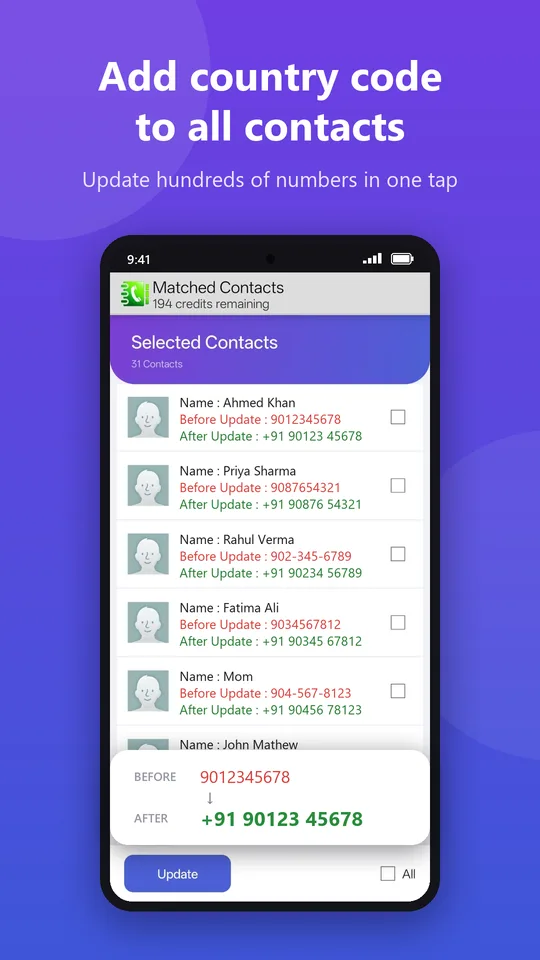
If anything looks wrong afterwards, tap Revert Changes and everything goes back to how it was. The app is free for up to 200 contacts, and your contacts never leave your phone.
Fix all your contacts in under a minute
Bulk add the country code with preview, backup and one-tap revert.
▶ Get it on Google PlayAfter updating: refresh your apps
- WhatsApp: start a new chat, tap ⋮ and choose Refresh.
- Signal and Telegram: these re-check your contacts automatically. Restart the app if names don't appear straight away.
Frequently asked questions
Can I add the country code to all contacts on iPhone?
iOS has no built-in bulk option either. You can use Method 2 with iCloud contacts (export a vCard from icloud.com), or edit contacts one by one.
Will adding the country code break local calls?
No. Phones dial international-format numbers correctly from inside the same country, so +92 300 1234567 works in Pakistan exactly like 0300 1234567.
What about numbers that already have a +?
Leave them as they are. They are already in international format.