 Add Country Code
WhatsApp contacts not showing after moving abroad? Here's the fix
You moved to a new country, got a local SIM and switched WhatsApp to your new number. Now friends and family from home are missing from your contact list, or their chats show a phone number instead of a name. Your contacts haven't gone anywhere. WhatsApp just can't match them any more.
Why it happens
WhatsApp finds your friends by matching the numbers in your phone's contact list to WhatsApp accounts. When a number is saved without a + and country code, WhatsApp assumes it belongs to the same country as your own WhatsApp number.
Here's an example. You're from Pakistan and saved your brother as 0300 1234567.
- With a Pakistani WhatsApp number, WhatsApp reads it as
+92 300 1234567, which is correct. - After you switch to a Saudi number, WhatsApp reads it as
+966 300 1234567. That number doesn't exist, so your brother disappears from your contacts.
The same thing happens in Signal, Telegram and Viber, which match contacts the same way.
The fix: save every number from your home country in full international format (+92 300 1234567). Then it works no matter which country your own number is in.
Fix 1: Update all contacts at once (recommended)
If you have more than a few contacts from home, editing them one by one takes hours. Add Country Code updates them all in one go:
- Install Add Country Code and allow contacts access.
- Tap Backup Contacts.
- Open Pending Contacts. Your home-country numbers show up as groups, such as "starting with 03, length 11".
- Tap Update, choose your home country (not the country you live in now), and keep Remove preceding trunk code ticked if the numbers start with 0.
- Check the preview and tap Update.
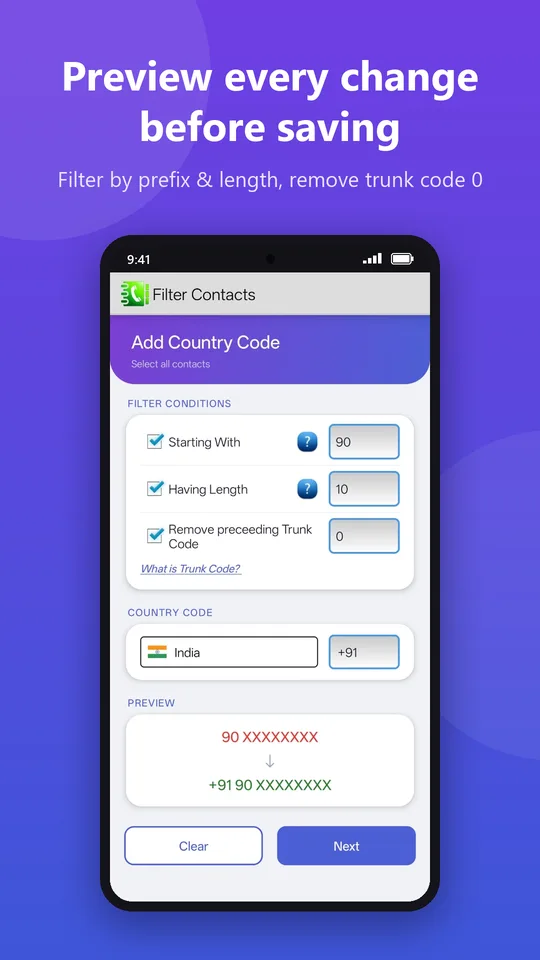
If you have local numbers from your new country too, run it again for those with the new country's code. That way every contact works, even if you move again later.
Fix 2: Edit the contact manually
For just a few contacts, open each one in your Contacts app, remove the leading 0 and add + and the country code at the start, then save.
Then refresh WhatsApp
- Open WhatsApp and tap the new chat button.
- Tap ⋮ (top right) and choose Refresh.
- Your contacts should appear with their names within a few seconds.
Still missing? Check these
- Contacts permission: go to Settings → Apps → WhatsApp → Permissions and make sure Contacts is allowed.
- Which account the contact is saved to: contacts saved to an account that isn't syncing, or that your Contacts app is hiding, may not be visible to WhatsApp. Check Contacts → Settings → Contacts to display.
- The person changed their number: if they also moved or switched SIM, the number you have might simply be out of date.
- They're not on WhatsApp with that number. Ask them to confirm which number they use for WhatsApp.
How to stop it happening again
Always save new numbers with + and the country code, even local ones. It takes two extra seconds and means your contacts keep working wherever you are.
Get your contacts back in WhatsApp
Add the country code to all contacts in one tap, with preview, backup and undo.
▶ Get it on Google PlayWhatsApp, Signal, Telegram and Viber are trademarks of their respective owners. Add Country Code is not affiliated with them.