 Add Country Code
Fix contacts after changing your SIM country
You put a new SIM from another country in your phone, for travel, a new job or a move, and suddenly things stop working. Calls to people back home fail or reach a stranger. Text messages don't arrive. Incoming calls show a number instead of a name. All three problems have the same cause and the same fix.
What goes wrong, and why
1. Outgoing calls and SMS fail
A number saved as 050 123 4567 has no country attached. Your phone sends it to whatever network you're on now, so on a UK SIM it's treated as a UK number. It fails, or worse, rings someone else.
2. Incoming calls show a number instead of a name
When someone from home calls you abroad, the network shows their number in international format, such as +966 50 123 4567. Your phone has to match that with 050 123 4567 in your contacts. Android usually manages, but not always, especially when the new SIM's country is different from the contact's. Some smartwatches and car systems are even stricter.
3. Messaging apps lose contacts
If you also move WhatsApp, Signal or Telegram to the new number, they start treating local numbers as belonging to the new country. See WhatsApp contacts not showing after moving abroad.
The fix for all three: save every contact in international format, with +, the country code, and no leading 0. An international number means exactly one phone everywhere in the world, on any SIM.
Fix all contacts in one go
- Install Add Country Code and allow contacts access.
- Tap Backup Contacts so you can undo everything later.
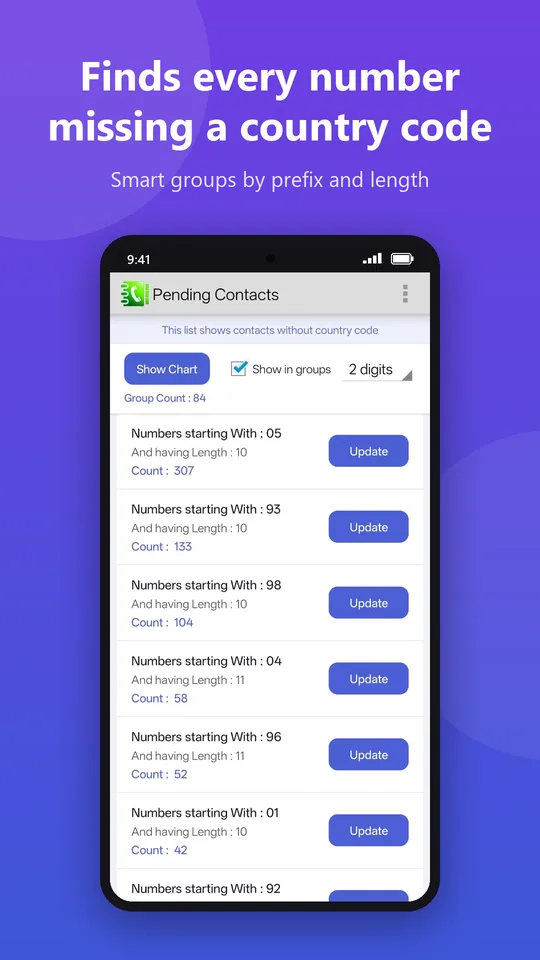
- Open Pending Contacts. Numbers without a country code are grouped by their first digits and length, which makes it easy to see which country each group belongs to.
- For each group, tap Update, choose the country those numbers are from, and tick Remove preceding trunk code if they start with 0.
- Check the before/after preview and tap Update.
Tip: work out the country from the number
| Local mobile number looks like | Probably from | Code |
|---|---|---|
| 03xx xxxxxxx (11 digits) | Pakistan | +92 |
| 9xxxxxxxxx / 8xxxxxxxxx / 7xxxxxxxxx / 6xxxxxxxxx (10 digits) | India | +91 |
| 05x xxx xxxx (10 digits) | Saudi Arabia or UAE | +966 / +971 |
| 07xxx xxxxxx (11 digits) | United Kingdom | +44 |
| 01x xxxx xxxx (11 digits) | Egypt or Bangladesh | +20 / +880 |
| 09xx xxx xxxx (11 digits) | Philippines | +63 |
Where two countries use the same pattern (like Saudi Arabia and the UAE), use the preview to untick contacts from the other country, then run a second update for them.
Dual SIM users
With two SIMs from different countries, local-format numbers are a guessing game: the phone uses whichever SIM places the call. International format removes the guesswork, because every number dials correctly from either SIM.
Going home again?
You don't need to change anything back. International-format numbers also work perfectly on your home SIM.
Make your contacts work on any SIM
Bulk add country codes with preview, automatic backup and one-tap revert.
▶ Get it on Google Play